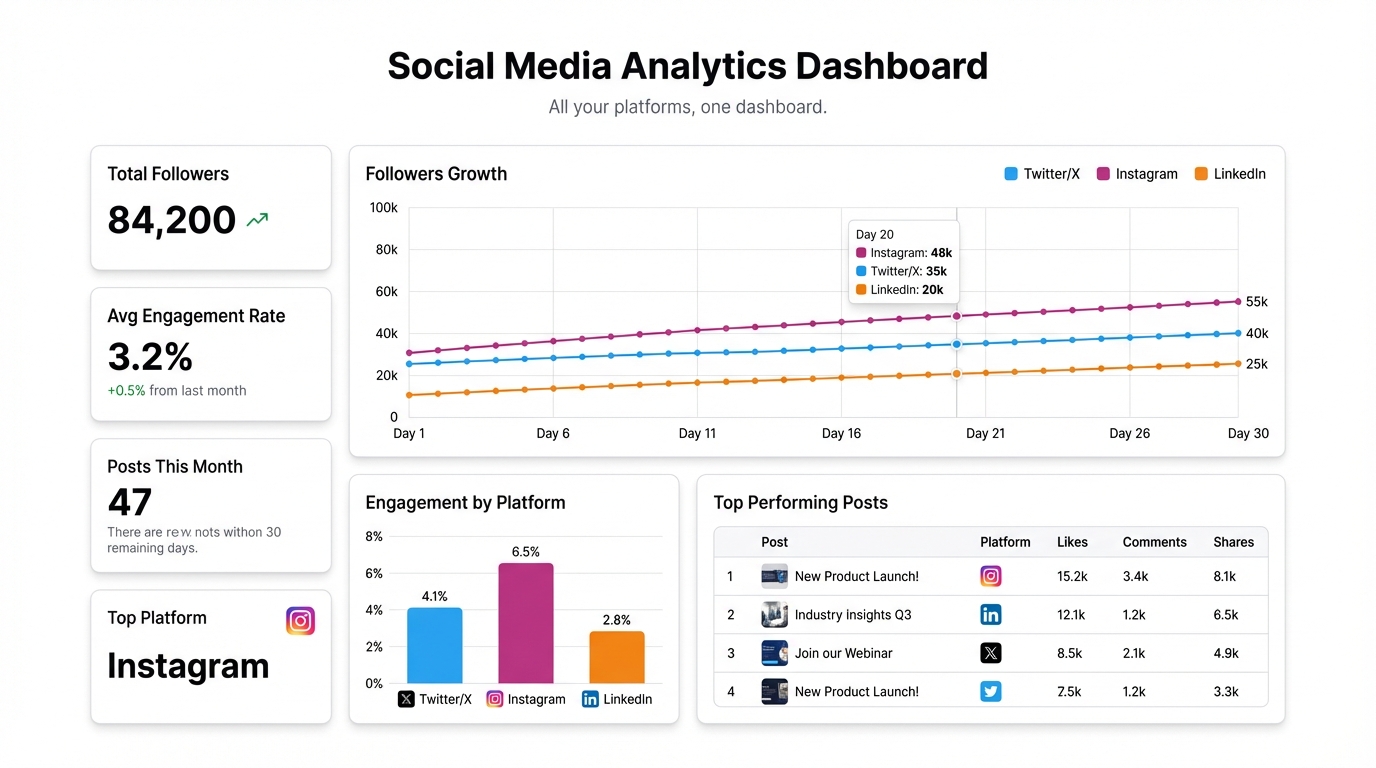
Every platform gives you analytics. None of them talk to each other.
LinkedIn tells you impressions and click-through rates. Instagram shows reach and saves. Twitter gives you engagements and profile visits. All three use slightly different definitions for the same concepts, present the data in completely different formats, and live behind three separate logins.
If you want to understand how your social media is actually performing — across all channels, over time, with consistent metrics — you have to do it yourself.
Why native analytics aren’t enough
The problem isn’t the data. Each platform captures quite a lot of it. The problem is that native analytics are designed to keep you inside the platform, not to give you a clear picture of your overall social strategy.
LinkedIn’s analytics dashboard encourages you to look at LinkedIn. Instagram’s encourages you to post more to Instagram. Neither has any incentive to show you that your Twitter content drives 3× more website traffic despite half the follower count.
That cross-platform view is exactly what you need to make good decisions about where to focus your time and budget. You’re not going to get it from any single platform’s built-in tools.
The CSV export approach
Every major platform lets you export your analytics as a CSV. It’s not glamorous, but it works.
Twitter/X: Analytics → Export data → select date range → download. You get impressions, engagements, link clicks, retweets, likes per tweet.
Instagram: Professional dashboard → Export → date range. Reach, impressions, profile visits, website taps, follower growth.
LinkedIn: Analytics → Posts → Export. Impressions, clicks, CTR, reactions, comments per post.
Once you have the exports, the challenge is that they all have different column names, different date formats, and different levels of granularity. Combining them manually in Excel is a multi-hour project that goes out of date the moment you close the file.
Building a unified social media dashboard in Infograph
Upload your CSV exports to Infograph and describe what you want to see. The AI maps the columns, reconciles the different formats, and builds the dashboard.
Something like: “Show me total impressions by platform by week, link clicks over time, and top performing posts across all channels” — and Infograph figures out which columns in each file correspond to those concepts.
If your terminology doesn’t match perfectly across files (LinkedIn calls it “clicks” and Twitter calls it “link clicks”), Infograph handles the disambiguation. You get one coherent dashboard instead of three incompatible spreadsheets.
What to put on the dashboard
A social media analytics dashboard that’s worth checking every week needs to answer a few specific questions:
Which platform is driving real outcomes? Impressions feel good. Website traffic and conversions are what matter. Include a metric for link clicks or profile visits alongside raw reach numbers.
What content format is working? If you post a mix of articles, images, and short-form text, you need to see performance by format — not just by platform. The best-performing content type might be the one you’re posting least.
Is the trend up or down? A trailing 30-day view of impressions and engagement rate (engagements divided by impressions, not by followers — the denominator matters) tells you whether your content is getting better traction or losing it.
Which posts punched above their weight? Sort by engagement rate, not absolute engagement numbers. A post that reached 500 people with a 12% engagement rate is more interesting than one that reached 10,000 at 0.5%.
Updating the dashboard
The limitation of the CSV export approach is that you have to re-upload when you want fresh data. For weekly reporting this is fine — set a recurring reminder, pull the exports, drop them into Infograph, done.
If you’re managing social media for clients or tracking performance daily, connecting Google Sheets as a live data source is cleaner. Pull your CSV exports into a master Google Sheet, connect that sheet to Infograph, and the dashboard updates automatically as the sheet changes.
Either way, the point is to have one place where social performance across all platforms lives — not three separate dashboards that you have to mentally reconcile every time you present results to someone.
Social media reporting doesn’t need to be as fragmented as the platforms themselves. The data is all there. You just need to bring it together.


