Someone sends you a .parquet file. Now what?
If you’re a data engineer, you fire up Python, import pyarrow or pandas, write a few lines to read the file, then print the first 10 rows to a terminal. If you want to actually see the schema — column types, compression codecs, row group metadata — that’s more code. If you want to edit a value, that’s even more code. And if you’re not a data engineer, you’re stuck Googling “how to open parquet file” and finding answers that all start with pip install.
We built a free Parquet viewer and Parquet editor that runs in your browser. No Python, no Spark, no command line. Drop the file, see the data.
What You Get
Parquet Viewer
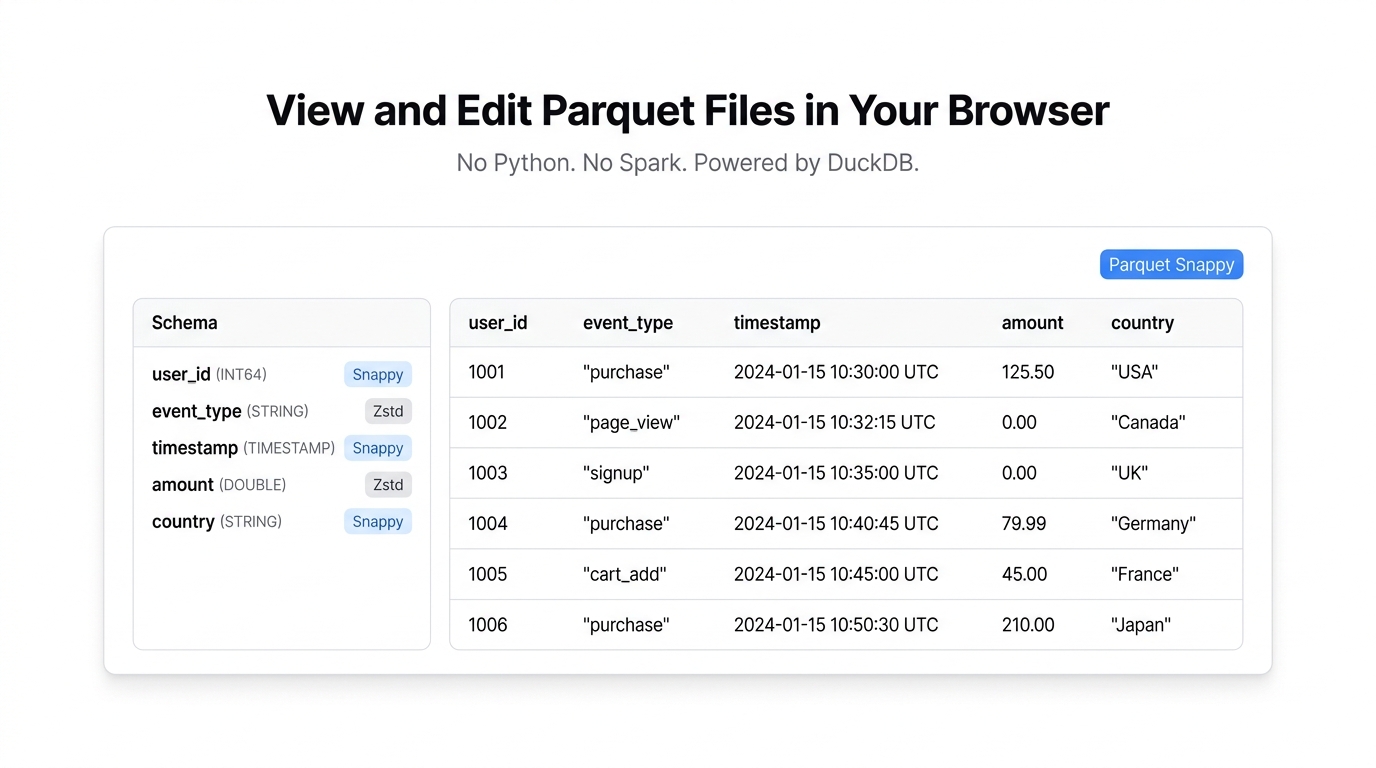
The Parquet viewer shows you everything about a Parquet file without writing a single line of code.
The data grid — your rows and columns in a sortable, filterable table with virtual scrolling. Works the same as a spreadsheet grid, except it handles millions of rows without slowing down.
The schema panel — this is the part that’s actually hard to get from most tools. For each column you see:
- Column name and logical type (STRING, INT64, DOUBLE, TIMESTAMP, etc.)
- Physical storage type
- Compression codec (Snappy, Gzip, Zstd, LZ4, or uncompressed)
Row group metadata — row counts, compressed sizes, and per-column min/max statistics. Useful for understanding how the file is partitioned and whether your compression is doing its job.
You can export the data to CSV, JSON, Parquet, or Excel if you need it in a different format.
Parquet Editor
The Parquet editor adds write operations on top of everything the viewer does.
- Cell editing — double-click any cell to change its value
- Row operations — add new rows, delete existing ones
- Column operations — add columns, delete columns, rename headers
- Find and replace — plain text or regex, case-sensitive matching
- Undo/redo — 50 levels of history
- Export as Parquet — re-encodes with Snappy compression by default
The schema panel updates in real time as you rename columns or change data. When you export back to Parquet, the file is properly encoded — not just a renamed CSV.
The Technology
Both tools run on DuckDB compiled to WebAssembly. DuckDB has native Parquet support — it reads the file format directly, including all the metadata, compression codecs, and nested types that make Parquet useful in the first place.
This matters because most “Parquet viewer” tools you find online either:
- Ask you to upload the file to their server (privacy problem)
- Convert it to CSV on the backend and show you that (loses all Parquet metadata)
- Require a Python environment (not always available)
With DuckDB running in-browser, parsing happens locally. The file never leaves your machine. And because DuckDB understands Parquet natively, you get the full schema, compression info, and row group statistics — not a dumbed-down CSV preview.
Who This Is For
Data engineers debugging pipelines. You wrote a Spark job that outputs Parquet. You want to check the output — verify column types, see if nulls ended up where they shouldn’t, confirm the compression codec is what you specified. Normally this means SSH into a server or spin up a Jupyter notebook. Now it’s a browser tab.
Analysts who received a Parquet file. Someone from the data team exported a dataset as Parquet because it’s smaller and faster than CSV. You don’t have Python installed. You don’t want to install Python. You just want to see what’s in the file and maybe export it to CSV so you can use it in Excel.
Anyone inspecting files from data lakes. S3 buckets full of Parquet files. You downloaded one and want a quick look before deciding if it’s the right dataset. Faster than spinning up Athena or loading it into a notebook.
Teams that need quick edits without code. A column name has a typo. A few values are wrong. Instead of writing a Python script to read, modify, and re-write the Parquet file, you open it in the editor, fix what needs fixing, and export. Done in 30 seconds.
Parquet vs. CSV: When It Matters
If you’re reading this, you probably already know — but for the search engine’s benefit:
Parquet is a columnar file format. CSV is row-based plain text. Parquet files are smaller (compression is built in), faster to query (columnar storage means you only read the columns you need), and preserve type information (a number stays a number, a date stays a date).
The trade-off is that Parquet files aren’t human-readable. You can’t open them in a text editor. That’s exactly why a browser-based viewer exists — to give you the “open it and look” experience that CSV has by default, but for a format that’s better suited to serious data work.
What It Doesn’t Do
This isn’t a replacement for pyarrow or pandas. Complex transformations, joins across multiple files, custom aggregations — those still need code. And if you’re working with nested Parquet schemas (structs inside arrays inside maps), the grid view flattens things in a way that may lose some structural nuance.
It’s the right tool for inspection and light editing. Not for building data pipelines.
Try It
- Parquet Viewer — inspect schema, metadata, and data
- Parquet Editor — view, edit, and export Parquet files
Drop a .parquet file and see what’s inside. No setup, no sign-up.